 ASysT Rendering
 Get ASysT Rendering
The recommended path is the VS Code extension: install it from the Marketplace, open your SysML folder, and keep source navigation beside the diagrams. Standalone Windows x64 and Linux x64 apps remain available when VS Code is not an option. The Modeler is Pre-alpha.
Windows standalone: install in three steps
About one minute, no administrator rights needed.
1Unzip
Extract the zip anywhere you like — your Desktop, D:\Tools, a USB stick.
Everything the app needs is inside the folder; nothing is written to Program Files or
the registry.
2Run
Double-click ASysT Rendering.exe. A console window opens and stays open
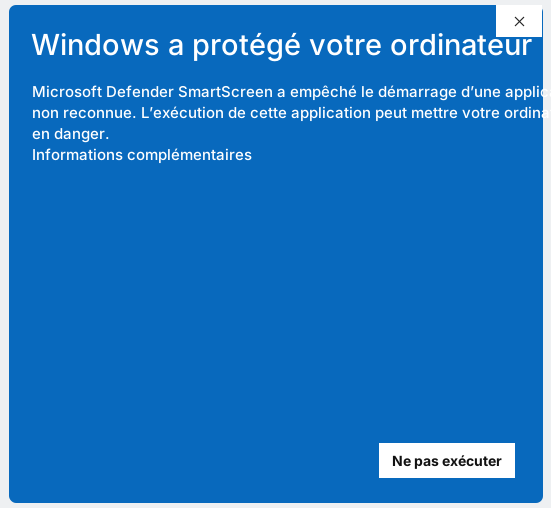
while you work — closing it stops the app. Windows may show a SmartScreen notice the
first time (see below) and a firewall prompt: the app only talks to your own machine.
3Open your model
Your browser opens on the bundled demo model. Use Open project folder inside
the app to point it at any folder with .sysml files — layouts are saved
as sidecar files next to your model. Source changes happen only when you explicitly use the
Modeler or Source Card and pass whole-model validation.
About the SmartScreen notice
"Windows protected your PC" is expected — here is why, and how to check the download.
🛡Why it appears
ASysT Rendering is an early tool with a Pre-alpha Modeler, and its executable is not yet code-signed. A commercial signing certificate requires identity validation and recurring cost; at this stage we are investing first in product validation and transparent release checks. Windows therefore shows its standard notice for unrecognised apps. Signing is planned as the project grows. The notice is not proof that a file is safe: verify the source and checksum first.
✓Verify your download
Every release ships with a SHA-256 checksum
(Windows .sha256 or
Linux .sha256).
Compare it in PowerShell with Get-FileHash <zip> — if the hashes
match, the file is exactly what was published here. On Linux use sha256sum <archive>.
Linux x64 standalone
The first supported Linux target is Ubuntu 22.04/24.04 on x86_64 with glibc. ARM64, Alpine/musl and macOS are not supported.
1Extract
Run tar -xzf ASysT-Rendering-*-linux-x64.tar.gz. No root access or installer is needed.
2Run
Open a terminal in ASysT Rendering and run ./asyst-rendering. Keep the terminal open; Ctrl+C stops ASysT.
3Open your model
Your browser opens locally. Use Open project folder for any folder containing .sysml files.